General Settings
General Settings
The Breezz General Settings tab allows administrators and developers to configure core framework parameters, set up custom plugins, manage async execution strategies, and define log retention lifespans.
To access these settings, navigate to Breezz Setup → General Setup.
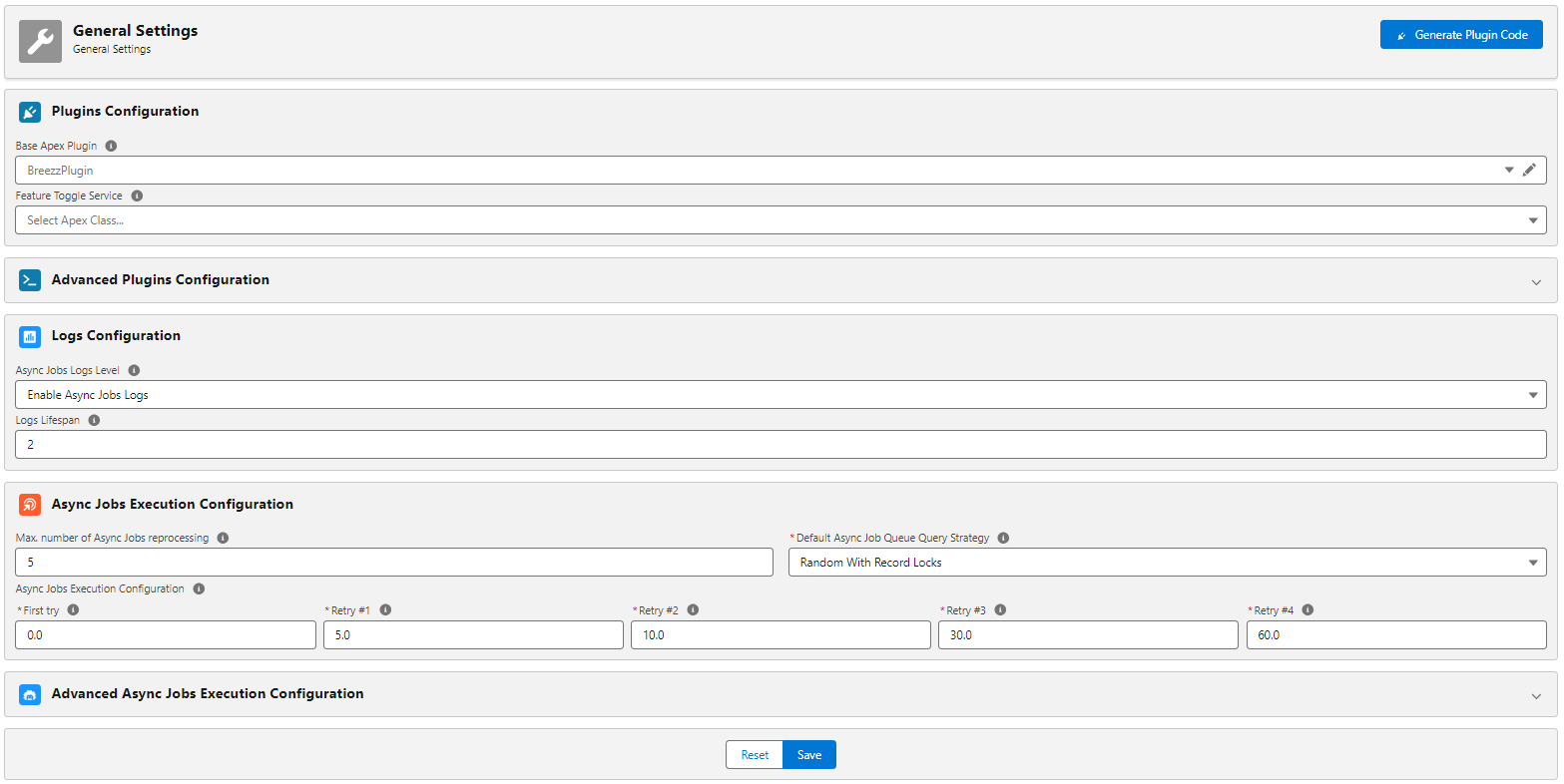
Plugin Configuration
- Base Apex Plugin: Allows specifying a custom Apex class instance creator. Enter the class name that implements the
BreezzPlugins.BaseApexPlugininterface. - Feature Toggle Service: Used to dynamically enable or disable system features. Enter the class name that implements the
BreezzPlugins.FeatureToggleServiceinterface.
Advanced Plugins Configuration
- Async Execution Strategy Provider: Enables custom
AsyncExecutionStrategyhandlers. Enter the class name that implements theBreezzPlugins.AsyncExecutionStrategyProviderinterface. - Scheduler Interval Handler Provider: Allows registering custom schedule interval handlers. Enter the class name that implements the
BreezzPlugins.SchedulerCustomIntervalHandlerProviderinterface.
Logs Configuration
- Async Jobs Logs Level: Defines the default logging level for asynchronous request executions.
- Logs Lifespan: Value in days defining how long log records are stored in Salesforce before being automatically purged by the framework.
Async Jobs Execution Configuration
- Max. number of Async Jobs reprocessing: Maximum number of automatic retries for failed Async Jobs. Once the
Max Failed Trieslimit is reached, the job status changes toErrorand requires manual intervention. - Default Async Job Queue Query Strategy: Defines the strategy used when querying and processing the Async Job Queue.
- First try: Specifies the delay in minutes before executing the first retry attempt for an async job.
- Retry #x: Specifies the delay in minutes before executing subsequent retry attempts (
Retry #2,Retry #3, etc.).
Advanced Async Jobs Execution Configuration
- Max. Async Limit Threshold [0%-100%]: Determines the maximum Async Apex Limit usage threshold allowed before running framework async processes. If system limit usage exceeds this percentage, Breezz will queue jobs without executing them immediately to prevent Governor Limit exceptions.
- Add To Queue by Default: Sets the default value for the “Add To Queue” parameter on functional steps.
- Default Async Strategy: Defines the default async execution strategy for Async Job processing.
- Default Async Queue Platform Event: Specifies the API name of the default Platform Event used for asynchronous queuing.
- Default Async Queue Object: The Salesforce Object used to store and queue standard Async Jobs by default.
- Default Async Delayed Queue Object: The Salesforce Object used to store and queue delayed Async Jobs by default.