Data Loaders
The Data Loader feature in the Breezz Framework enables the creation of custom data fetching logic. It is particularly useful when complex queries are needed that go beyond what can be covered by the standard getStore().requestToLoad() method.
In scenarios where records require filtering using dynamic or complex WHERE clauses, Data Loaders allow you to gather specific datasets tailored for unique business logic implementations.
Data Loader Configuration
To configure a new Breezz Data Loader, navigate to Breezz Setup → Data Loaders and click New.
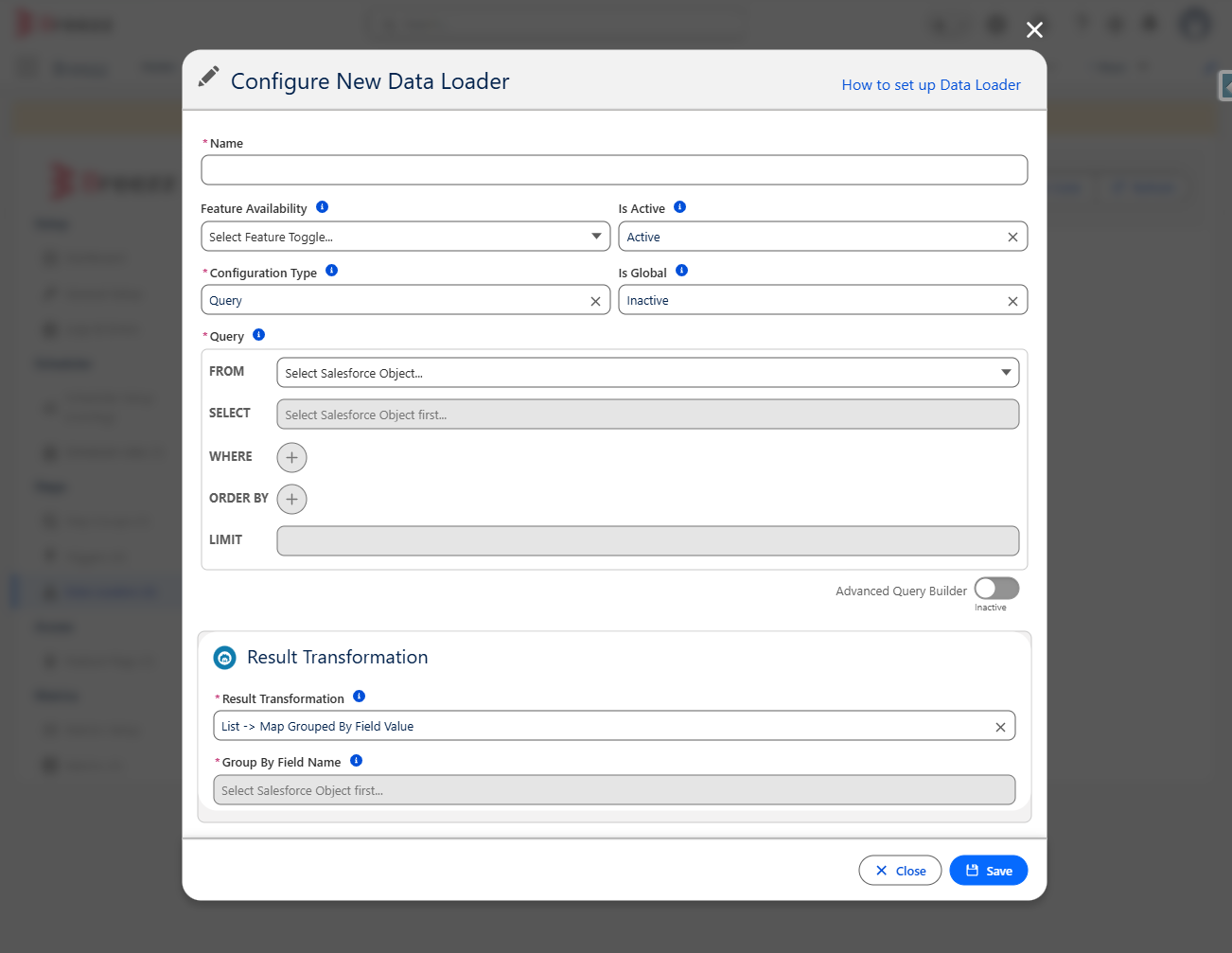
Field Details
- Name: The unique developer name of the data loader configuration (also referred to as
storeKey). - Feature Availability: Determines feature toggling and availability options.
- Is Active: Toggles whether the Data Loader is enabled.
- Configuration Type: The engine behind the Data Loader:
- Query: Build a query using the declarative query builder interface.
- Custom: Requires specifying a custom Apex Data Loader class name.
- Is Global: Determines if loaded results are cached in the global store (data will be loaded only once during the entire execution transaction).
- Query: (Available only for Query type) Specifies the SOQL query used to fetch records. Supports operators such as
In Keys/Not In Keysto filter records by keys passed via Apex usingrequestToLoad(). - Data Loader Class Name: (Available only for Custom type) Specifies the Apex class extending
forvendi.DataStore.Loader. - Result Transformation: Defines the shape of the returned dataset:
- None: Returns a single record or a list of records.
- List -> Map Grouped By Field Value: Transforms the result list into a
Map<Key, Record>, grouped by the Group By Field Name. - List -> Map of Lists Grouped By Field Value: Transforms the result list into a
Map<Key, List<Record>>, grouped by the Group By Field Name.
- Group By Field Name: The field used as a key to group returned records when Result Transformation is set to a Map variant.
Query Builders
Declarative Query Builder
The standard query builder offers a wide range of filtering criteria and dynamic value providers:
- Supported Operators:
Equals,Does Not Equal,Is Null,Is Not Null,Less Than,Less Than or Equal,Greater Than,Greater Than or Equal,In,Not In,Like,Not Like,In Keys,Not In Keys.- Note: Keys used by
In Keys/Not In Keysare provided in Apex viagetStore().requestToLoad().
- Note: Keys used by
- Supported Value Types: Static Value,
$Record,$User,$UserRole,$Profile,$Organization,$System,$RecordType,$CustomPermission,$Label, and Custom Settings.
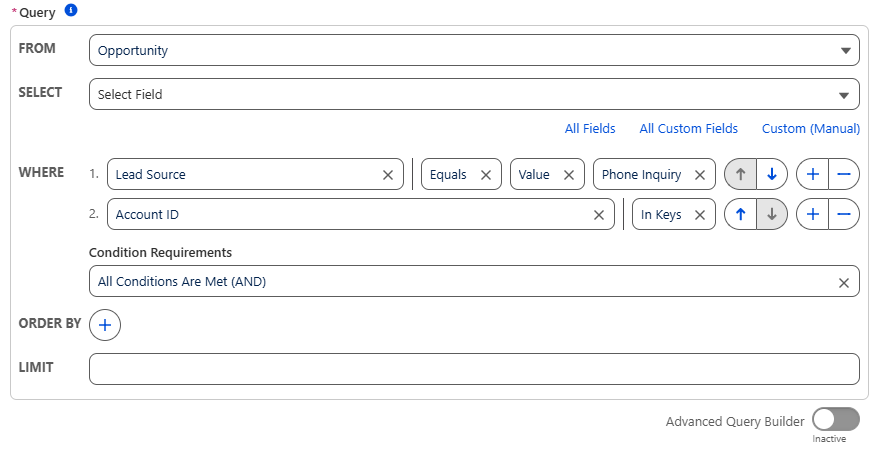
Advanced Query Builder
The Advanced Query Builder allows writing raw SOQL statements manually. You can utilize the :keys bind variable directly in the query to represent the collection of record keys passed to be loaded.

⚠️ Warning:
The Advanced Query Builder does not support all SOQL keywords. Clauses such asGROUP BY,ALL ROWS,ALL FIELDS, and inner subqueries are not supported in this builder mode.
Custom Data Loader
For complex retrieval logic that cannot be expressed via SOQL builders, you can write a Custom Data Loader in Apex.
A Custom Data Loader must extend the forvendi.DataStore.Loader abstract class and override its load() method. You can scaffold this code automatically by navigating to Breezz Setup → Data Loaders and clicking Generate Loader Code.
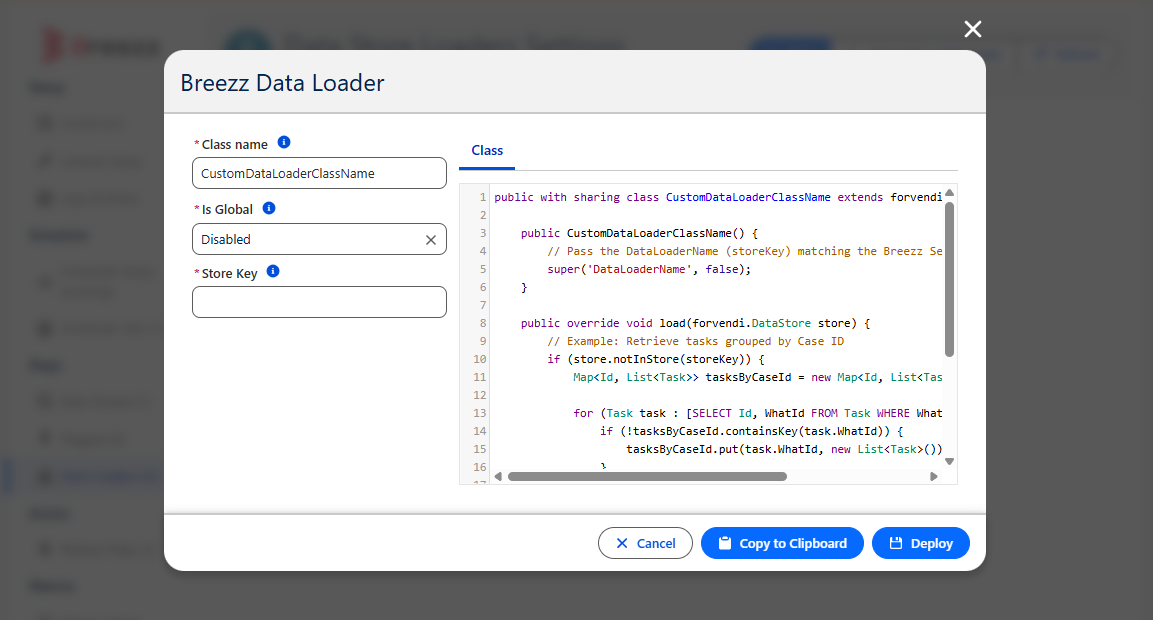
Apex Implementation Example
public with sharing class CustomDataLoaderClassName extends forvendi.DataStore.Loader {

    public CustomDataLoaderClassName() {
        // Pass the DataLoaderName (storeKey) matching the Breezz Setup UI configuration
        super('DataLoaderName', false);
    }

    public override void load(forvendi.DataStore store) {
        // Example: Retrieve tasks grouped by Case ID
        if (store.notInStore(storeKey)) {
            Map<Id, List<Task>> tasksByCaseId = new Map<Id, List<Task>>();

            for (Task task : [SELECT Id, WhatId FROM Task WHERE WhatId IN :store.getIds(storeKey)]) {
                if (!tasksByCaseId.containsKey(task.WhatId)) {
                    tasksByCaseId.put(task.WhatId, new List<Task>());
                }
                tasksByCaseId.get(task.WhatId).add(task);
            }

            store.storeData(storeKey, tasksByCaseId);
        }

        // Note: DML operations and asynchronous Apex calls are prohibited inside loaders.
    }
}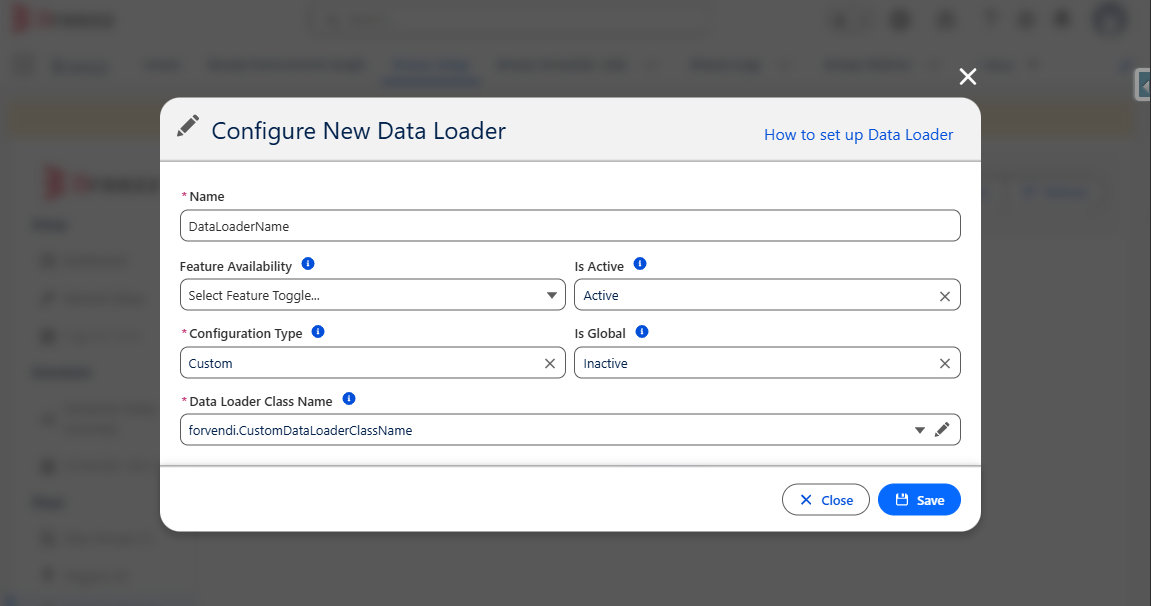
Once configured, the dataset stored under the designated storeKey can be accessed across your Step classes using:
Object data = getStore().getFromStore('DataLoaderName');