Feature Flags
Feature Flags
Feature Flags provide a flexible and scalable way to manage the delivery and evolution of software features, reducing risk and improving the ability to react to changes in the development process.
Core Advantages
- Controlled Delivery: Safely release and test features in production or sandboxes with minimal risk.
- Instant Bypassing: Turn off problematic logic or trigger processes instantly if issues arise.
- Granular Control: Restrict feature access based on environment type, user custom permissions, custom settings, or custom Apex plugins.
Feature Flag Configuration
To configure a new feature flag, navigate in Salesforce to: Breezz Setup → Feature Flags → New (or create a Feature Flag directly from the Dashboard).
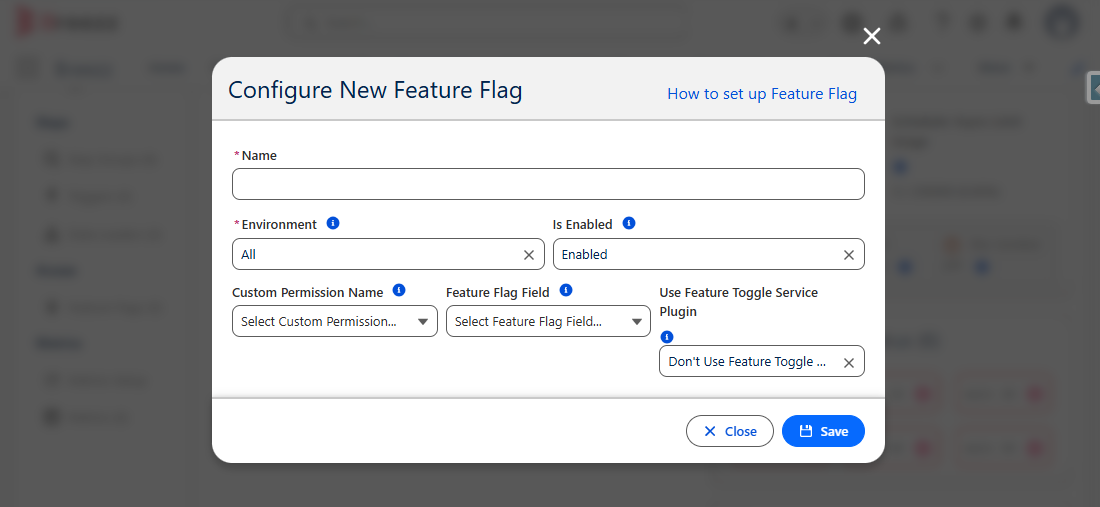
Field Details
| Field Name | Description |
|---|---|
| Name | The unique identifier or developer name of the feature flag configuration. |
| Environment | Determines the target environment where the feature is active: • All: Active in all Salesforce orgs. • Sandboxes only: Active only in Sandbox environments. • Production only: Active only in Production environments. |
| Is Enabled | Primary master toggle to enable or disable the feature flag. |
| Custom Permission Name | The API name of a Custom Permission. Feature availability will depend on whether the executing user has this permission assigned. |
| Feature Flag Field | The API name of a checkbox field on the Breezz Feature Flag Hierarchical Custom Setting. Feature availability will evaluate based on hierarchy rules. |
| Use Feature Toggle Service Plugin | When checked, feature availability evaluation is delegated to custom Apex logic implementing forvendi.BreezzPlugins.FeatureToggleService. |
💡 Apex API Reference: Looking for programmatic evaluation methods (
forvendi.BreezzApi.FEATURE) or custom plugin contracts? Check out the Breezz APEX API - Feature Reference and Interfaces - FeatureToggleService.