Child Record Creation
This example demonstrates how to create related child records (such as a Task) automatically when a parent record (such as an Opportunity) is created, utilizing the After Insert trigger pass and ModificationContext.
Step 1: Deploy the Apex Trigger
First, ensure the standard Breezz trigger handler is deployed on the target object (e.g., Opportunity):
trigger OpportunitiesTrigger on Opportunity (after delete, after insert, after undelete, after update) {
    forvendi.BreezzApi.TRIGGERS.handle();
}
Step 2: Configure the Breezz Trigger
In Salesforce, navigate to Breezz Setup → Triggers → New and register an After Insert trigger configuration for Opportunity.
Step 3: Create the Step Class
Create an Apex Step class extending forvendi.Step to instantiate and queue the child record insertion:
public with sharing class CreateTaskAfterOpportunity extends forvendi.Step {

    public CreateTaskAfterOpportunity() {
        super(CreateTaskAfterOpportunity.class.getName());
    }

    public override Boolean initRecordProcessing(Object record, Object optionalOldRecord) {
        SObject sfRecord = (SObject) record;

        // Instantiate a new child Task record linked to the incoming Opportunity
        Task task = new Task(
            Status = 'In Progress',
            Subject = 'Call',
            WhatId = sfRecord.Id
        );

        // Queue insertion using ModificationContext without executing immediate DML
        getContext().addToInsert(task);

        return false;
    }
}
Verification
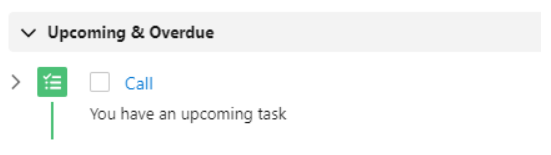
After committing an Opportunity, the Step executes and automatically attaches the new child Task record:
💡 Apex API Reference: To learn more about transactional insertion methods (
addToInsert), visit Breezz APEX API - ModificationContext.