Child Record Creation Not Present
This example demonstrates how to implement custom Data Loader logic to efficiently load, evaluate, and conditionally create or update related child records (such as completing existing Task records and creating a follow-up Task when a Case status changes).
Step 1: Create a Custom DataLoader Class
Create a custom data loader class extending forvendi.DataStore.Loader to bulk-fetch tasks associated with Case records in the execution context:
public class CaseTasksLoader extends forvendi.DataStore.Loader {

    public CaseTasksLoader() {
        super('CaseTasks', false);
    }

    public override void load(forvendi.DataStore store) {
        if (store.notInStore(storeKey)) {
            Map<Id, List<Task>> tasksByCaseId = new Map<Id, List<Task>>();

            for (Task task : [
                SELECT Id, WhatId
                FROM Task
                WHERE WhatId IN :store.getIds(storeKey)
            ]) {
                if (!tasksByCaseId.containsKey(task.WhatId)) {
                    tasksByCaseId.put(task.WhatId, new List<Task>());
                }
                tasksByCaseId.get(task.WhatId).add(task);
            }

            store.storeData(storeKey, tasksByCaseId);
        }
    }
}
Step 2: Create and Configure the Trigger
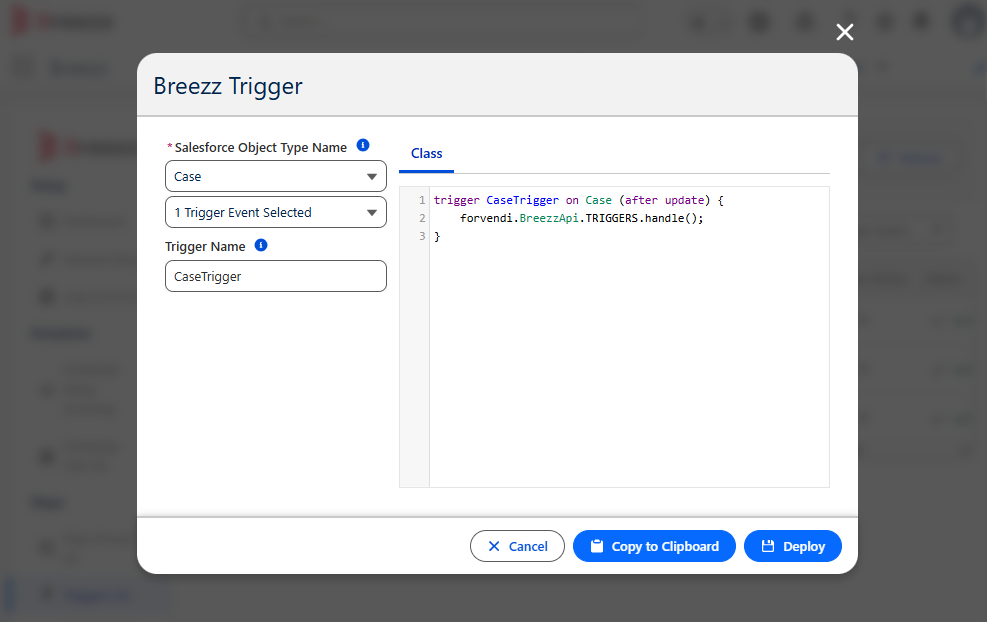
- Generate and deploy an Apex Trigger on
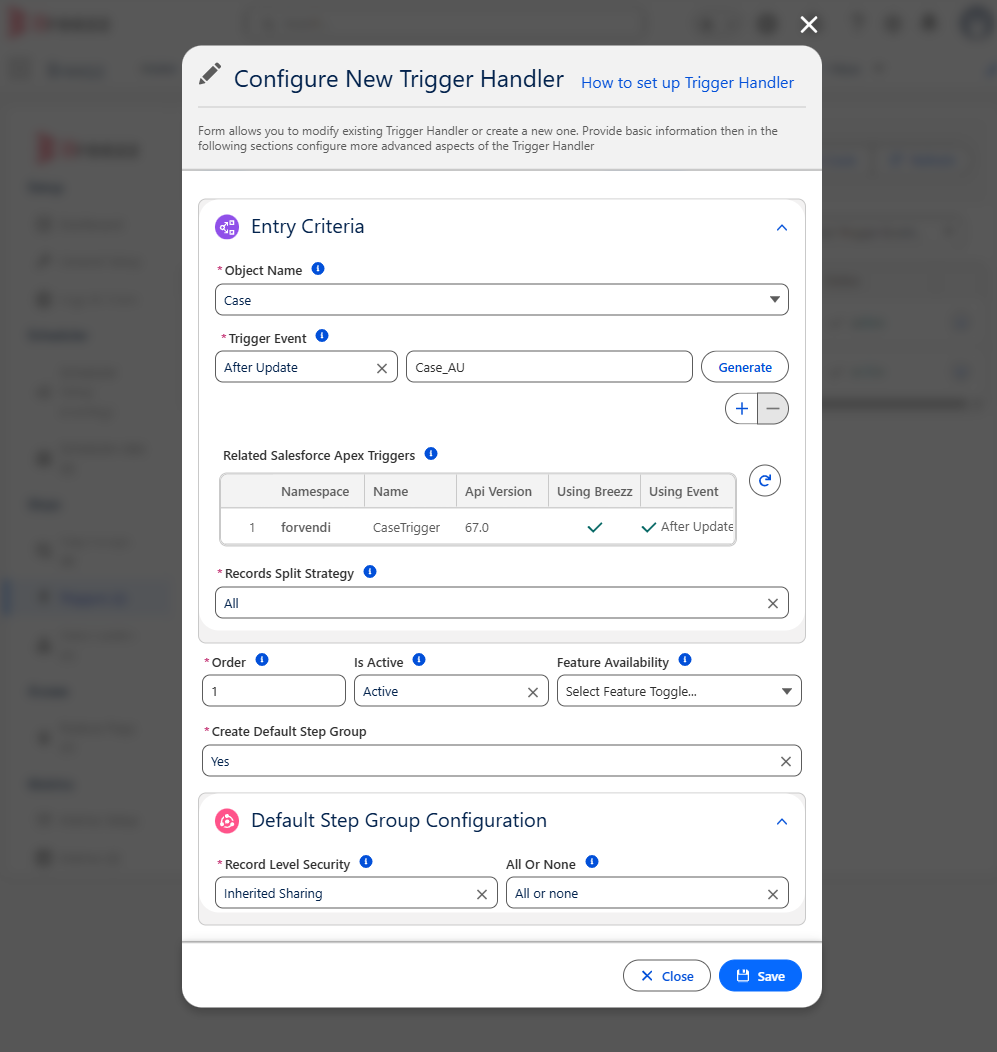
Case(After Updatepass). - Go to Breezz Setup → Triggers → New and configure the trigger for
Caseon After Update. - Set Create Default Step Group to Yes.
Step 3: Create the Step Class
Implement the step logic extending forvendi.Step. Request data pre-loading in initRecordProcessing and perform business updates in finishRecordProcessing:
public with sharing class CancelAllTasks extends forvendi.Step {

    public CancelAllTasks() {
        super(CancelAllTasks.class.getName());
    }

    public override Boolean initRecordProcessing(Object record, Object optionalOldRecord) {
        Case caseRecord = (Case) record;

        // Request DataLoader if Case Status was updated
        if (isNewOrChanged(caseRecord, (Case) optionalOldRecord, Case.Status) && caseRecord.Status != null) {
            getStore().requestToLoad('CaseTasks', caseRecord.Id);
        }

        // Return true to enable finishRecordProcessing pass after DataStore loads
        return true;
    }

    public override void finishRecordProcessing(Object record, Object optionalOldRecord) {
        Case caseRecord = (Case) record;
        Case oldCaseRecord = (Case) optionalOldRecord;

        if (getStore().getFromStore('CaseTasks') != null) {
            Map<Id, List<Task>> loadedCaseMap = (Map<Id, List<Task>>) getStore().getFromStore('CaseTasks');

            if (loadedCaseMap.containsKey(caseRecord.Id)) {
                // Mark existing open tasks as Completed
                for (Task tk : loadedCaseMap.get(caseRecord.Id)) {
                    getContext().addModificationToUpdate(tk.Id, Task.Status, 'Completed');
                }

                // Insert a new follow-up Task record
                getContext().addToInsert(new Task(
                    Subject = 'Follow up on status change: ' + oldCaseRecord.Status + ' -> ' + caseRecord.Status,
                    ActivityDate = System.today().addDays(1),
                    WhatId = caseRecord.Id,
                    OwnerId = UserInfo.getUserId()
                ));
            }
        }
    }
}
Step 4: Register the Step and Link the Custom DataLoader
You can link your custom DataLoader at either the Step Level or the Step Group Level.
Go to Breezz Setup → Step Groups → Select Group Name to open the Edit dialog and attach the DataLoader globally to the entire group.
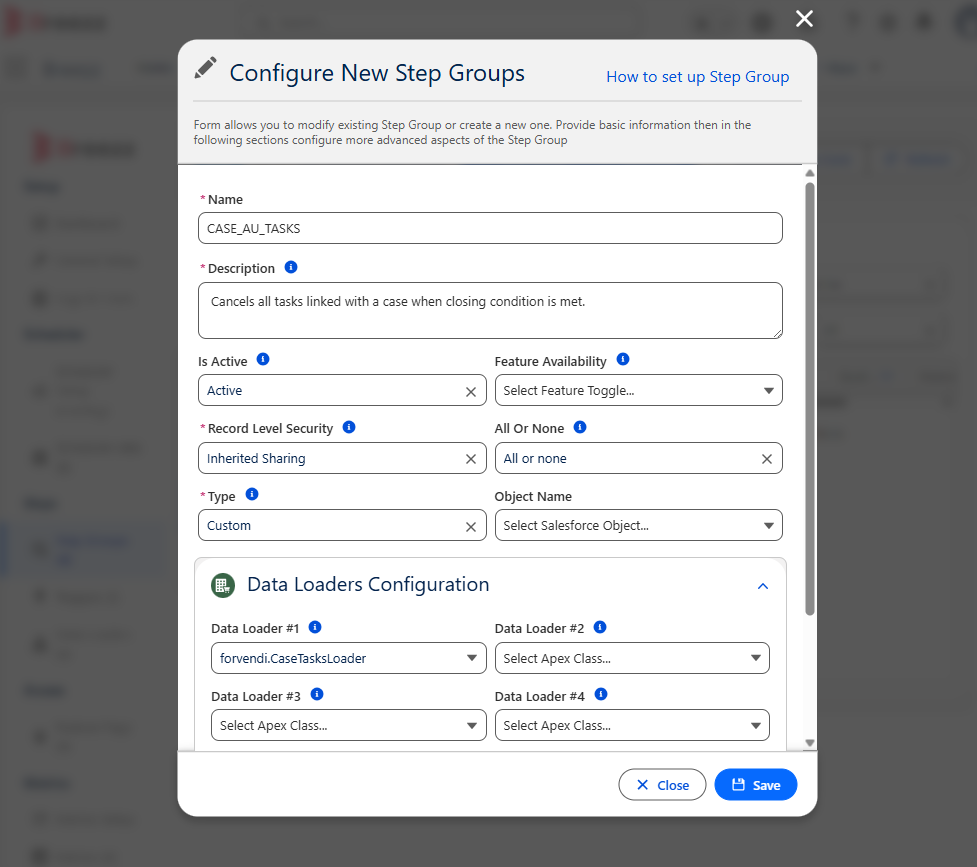 Add data loader.
💡 Apex API Reference: For details on caching mechanisms and loader configuration, visit Breezz APEX API - DataStore.