Architecture
Problem & Solution
The Salesforce Challenge
In Salesforce, business functionalities are executed in response to platform events, such as user actions (UI button clicks), API calls, or database triggers. Every event is processed within an isolated execution boundary that is strictly governed by transactional platform constraints known as Apex Governor Limits. (Apex Governor Limits).
Every operation consumes core platform resources—primarily CPU execution time, SOQL queries, and DML statements. As application complexity increases and multiple functionalities run simultaneously, cumulative resource consumption spikes. This can lead to:
- Transaction overload
- Unpredictable system behavior
- Data inconsistencies and loss
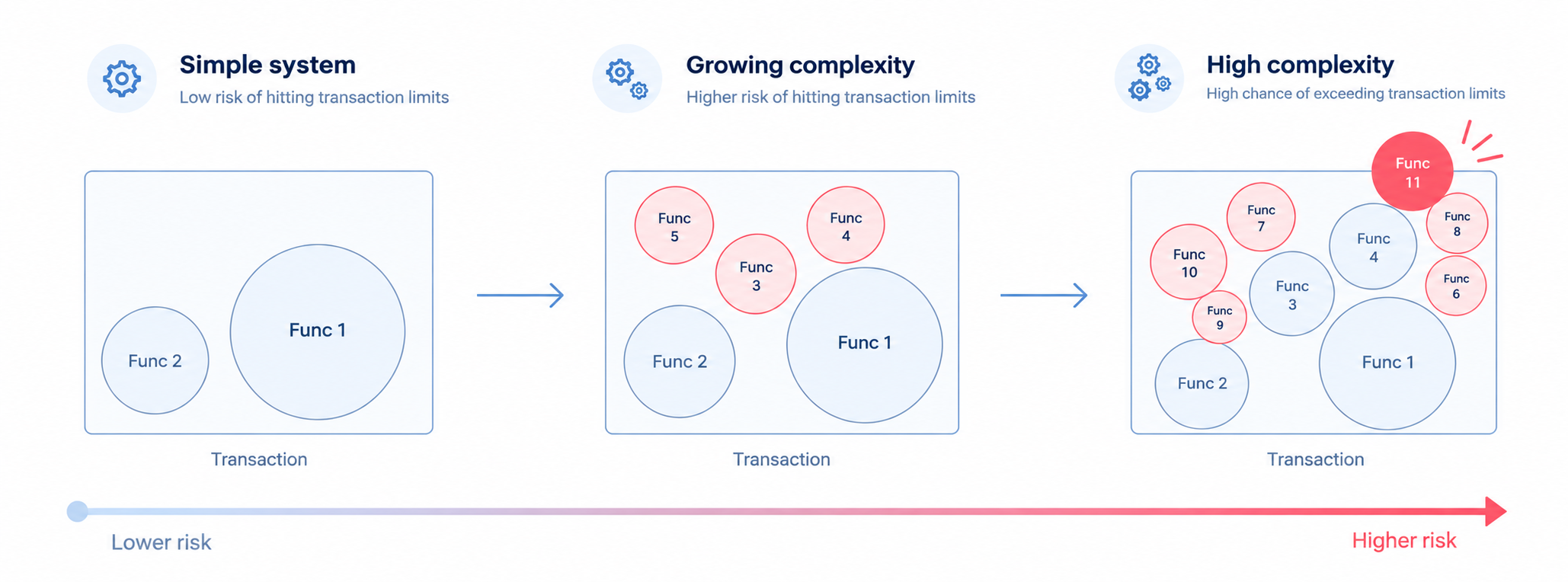
To prevent hitting platform limits, standard development traditionally relies on:
- Asynchronous Execution (Async Apex): Deferring heavy processing, which inevitably introduces its own set of limits and architectural complexity.
- Data Operation Reduction: Optimizing read (SOQL) and write (DML) transactions, which constitute the most time-consuming execution bottlenecks.
The Breezz Approach
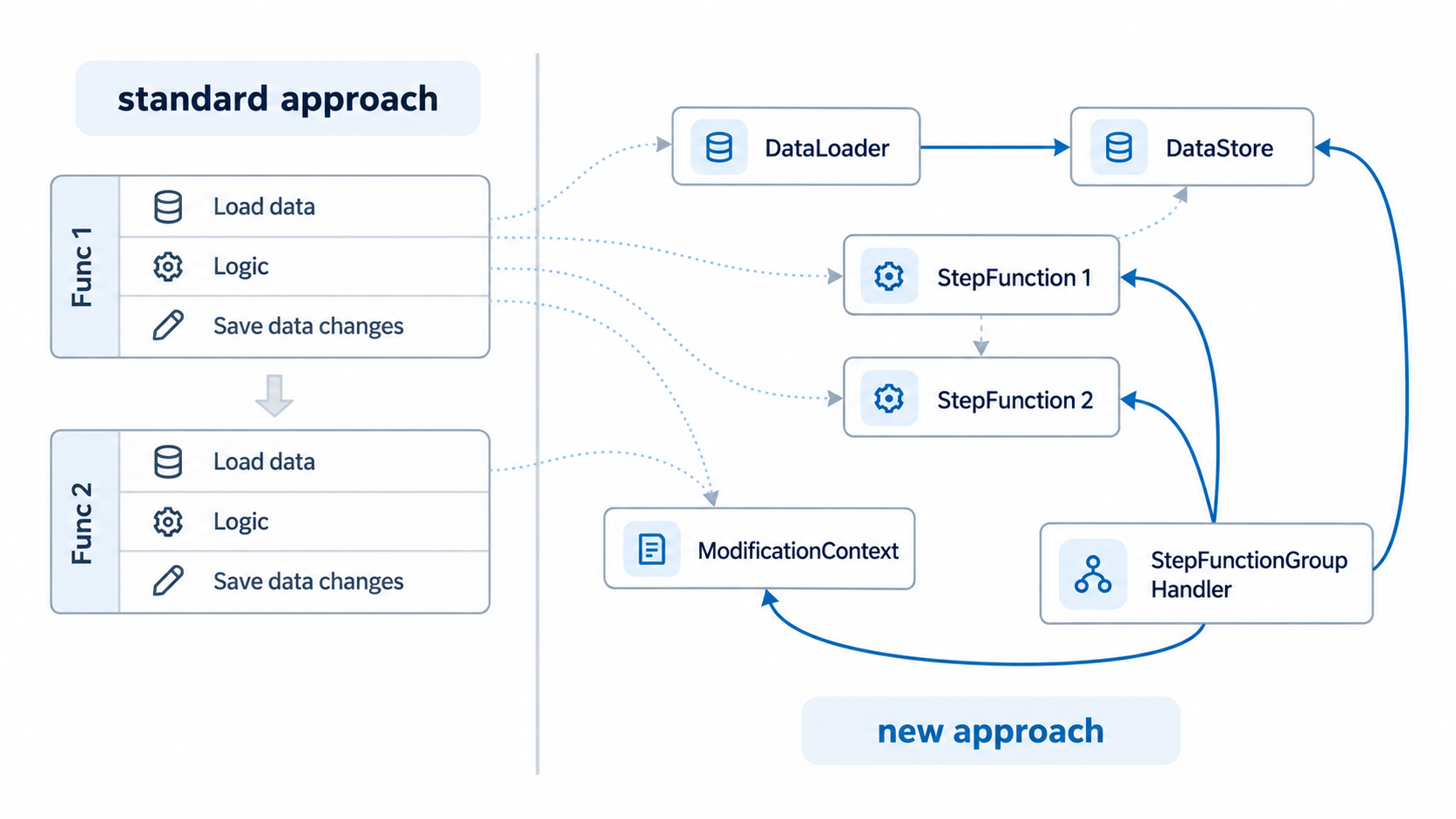
Breezz addresses these resource issues directly at the architectural level. It introduces specialized, structured interfaces designed to streamline data access, centralize DML operations, and execute functionalities in a highly optimized manner.
Core Components
Orchestration & Logic
-
Step Groups :
StepGroupHandlerManages a group of Steps and orchestrates the entire execution process. It instantiates a single, unifiedDataStoreandModificationContext, sharing them across all Steps within the group. This shared state drastically reduces duplicate SOQL queries and fragmented DML statements. -
Step: An atomic unit of business logic representing a specific functionality. Every step in a group accesses the shared
DataStoreandModificationContext.
Supporting Data Components
-
DataLoader: Responsible for fetching external or required database records. Custom loaders must implement the
forvendi.DataStore.Loaderinterface and be registered within the Step or Group configuration. -
DataStore: Acts as the central query and caching layer. It requests and caches data using Loaders, and can automatically handle flat SObject retrieval by Record ID via Generic Loaders (without requiring custom loader registration).
-
ModificationContext: A centralized buffer that gathers and stages SObject records. It executes deferred bulk operations (INSERT, UPDATE, DELETE) in a highly optimized manner.
Step Execution Order
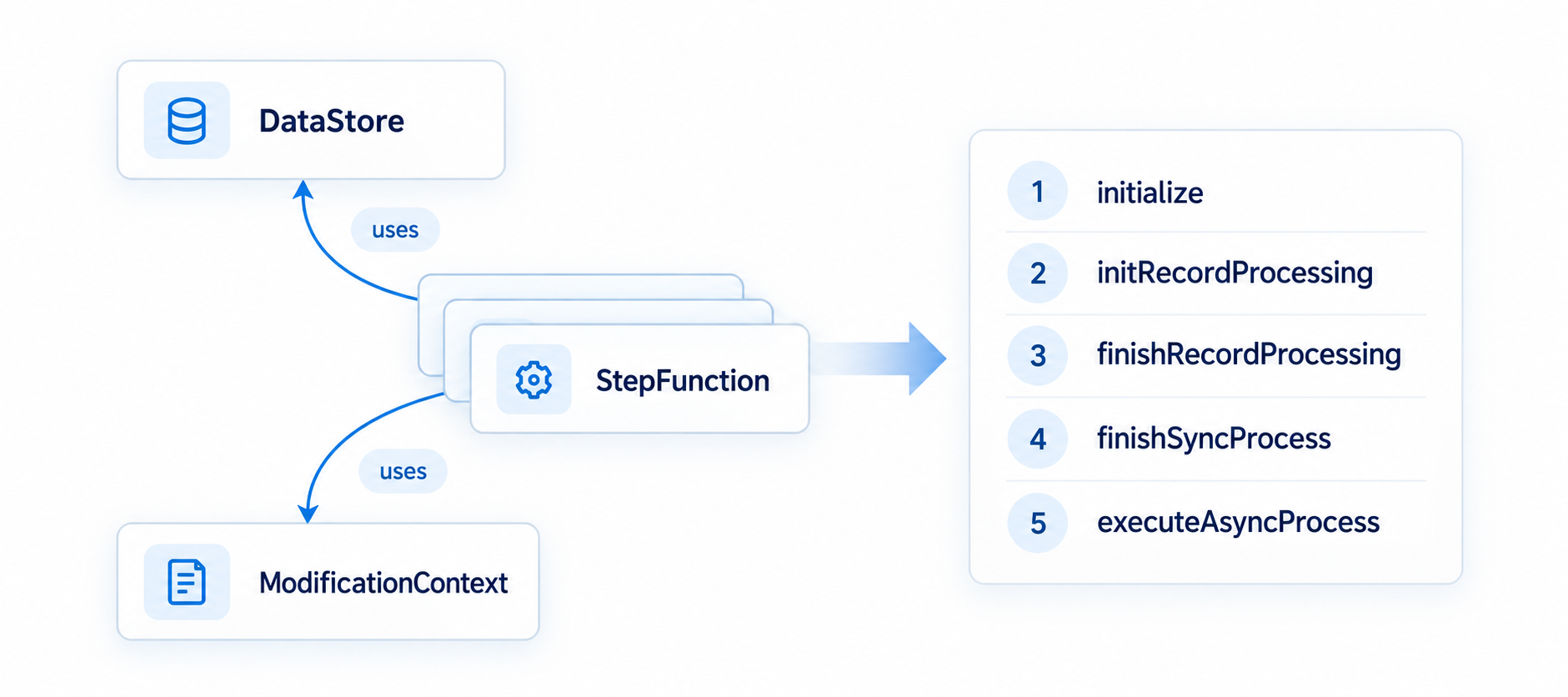
Step execution follows a predefined, strict 5-stage sequence managed by the StepGroupHandler:
-
void initialize()Executed once per step in the configured priority order. Used for step-level setup, such as loading Custom Metadata configurations. -
Boolean initRecordProcessing(Object record, Object optionalOldRecord)Evaluates and processes individual records. Modifies record fields directly if data is available upfront. Uses ModificationContext for related records and DataStore to request required data. Returns true to queue the record for the next phase. Strictly Prohibited: Executing DML or SOQL directly. -
void finishRecordProcessing(Object record, Object optionalOldRecord)Runs only for records that returned true in the previous stage. Finalizes record modifications. It executes after the DataLoader populates missing requested data into the DataStore. Strictly Prohibited: Executing DML or SOQL directly. -
void finishSyncProcess(List<Object> records, List<Object> optionalOldRecords)Wraps up synchronous processing for the entire step group. Always executes (even if the list is empty), handling records registered via the addToSyncFinish() method. -
void executeAsyncProcess(Map<String, forvendi.AsyncJobInfo> asyncJobsByRecordKey)Handles asynchronous processing tasks. Runs for all jobs registered during prior stages via the addAsyncJob() method.
Execution Contexts
The framework offers architectural flexibility and can be executed seamlessly from multiple entry points:
- Salesforce Triggers
- Salesforce Flows
- Direct Apex Code