Cleanup Batch
The Cleanup - Batch scheduler job is designed to securely delete significant data volumes by segmenting the operation into manageable chunks. This job type requires a SOQL Query to define the exact records slated for deletion.
Scenario: You generate and store system logs that need to be cleared every 8 hours to manage database storage limits.
For this example, we will configure a job to automatically clear the Account records created in the previous steps every 2 hours.
Step 1: Register the Scheduler Job
- To register a new Scheduler Job, navigate to Breezz Setup → Scheduler Jobs and click New.
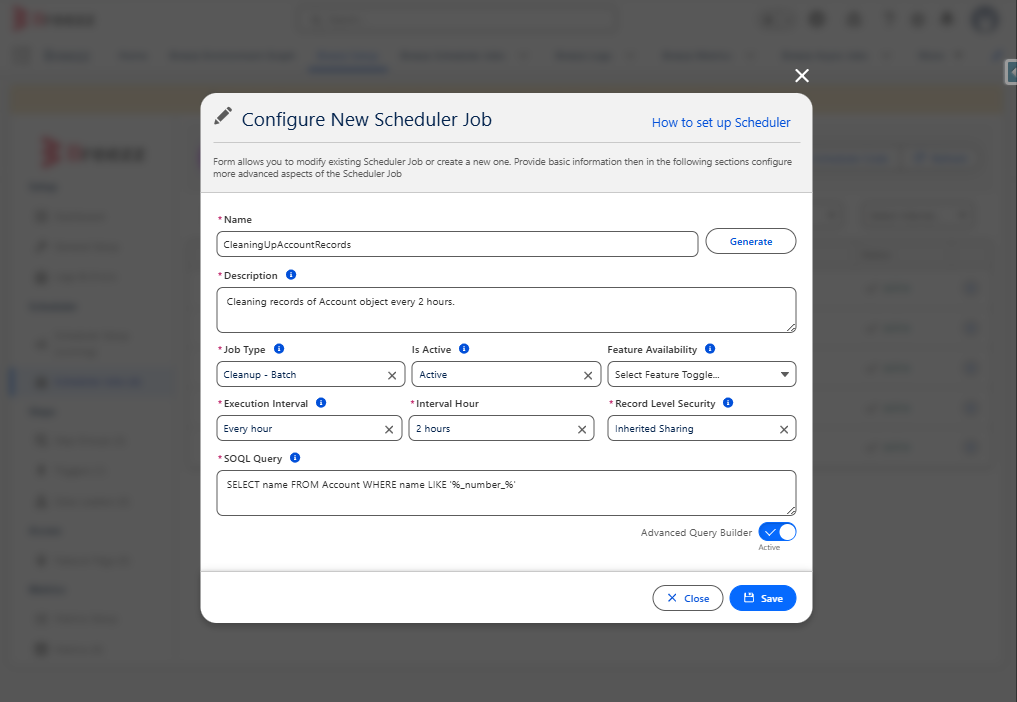
- Populate the configuration form with the following details:
- Name: Provide a clear identifier for the Scheduler Job.
- Description: Enter a comprehensive explanation of the job’s purpose.
- Job Type: Select Cleanup - Batch.
- Execution Interval: Define when the scheduler should execute (e.g., 2 hours).
- SOQL Query: Provide a
SELECTstatement that returns the IDs of the exact records you want to delete.
- After filling out all required fields, click Save and run the Scheduler.
Step 2: Verify the Scheduler Job
To confirm that the scheduler was created successfully, navigate to the App Launcher → Breezz → Breezz Scheduler Jobs.
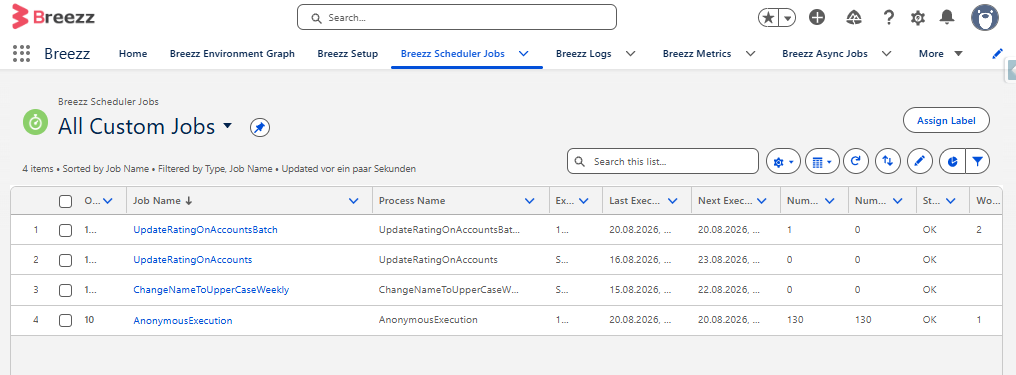
You should see your new record listed in the Scheduler Jobs list view, populated with the configuration data you provided, along with the timestamps indicating its Last Execution and Next Execution.